How to Disable the Reference Code Lens in VSCode for C#
If you ever need the reference count again, it’s just a few settings clicks away. How to Disable the Reference Code Lens in VSCode Here’s how you can easily turn off the reference code lens for C#: And that’s it! With this setting turned off, your editor will no longer display reference counts, giving you
In my work with C# in Visual Studio Code, I found the “Reference code lens” feature to be somewhat distracting. The reference numbers that appear above methods and properties can clutter the editor, especially when working with large files. If you’re like me and prefer a cleaner, less noisy environment, you’ll want to know how to turn this feature off. Fortunately, disabling it is quick and easy, and I’ll walk you through it.
Why Remove the Reference Code Lens?
By default, Visual Studio Code shows a “Reference code lens” that indicates how many times a method, class, or property is referenced in the code. While useful in some scenarios, this can become distracting when you’re focusing on the logic and structure of your code rather than its references. Turning off the code lens cleans up the interface, letting you focus better on your work.
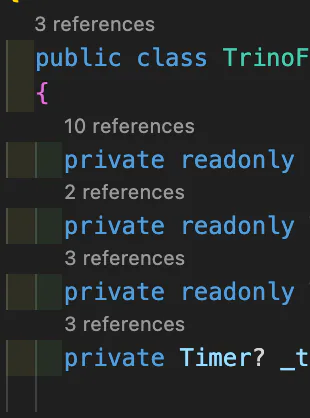
If you ever need the reference count again, it’s just a few settings clicks away.
How to Disable the Reference Code Lens in VSCode
Here’s how you can easily turn off the reference code lens for C#:
- Open the Settings
First, pressCtrl + ,(orCmd + ,on macOS) to open the settings panel. ![Open Settings Screenshot] - Search for “Reference code lens”
In the search bar at the top, type “Reference code lens”. This will bring up the relevant setting. ![Search for Reference Code Lens Screenshot] - Disable the Code Lens
You’ll find a checkbox labeled Reference Code Lens under the.NETsection. Simply uncheck it to disable the feature. Alternatively, if you prefer using thesettings.jsonfile directly, here’s what you’ll need to add or modify:
   {
       "dotnet.codeLens.enableReferencesCodeLens": false
   }
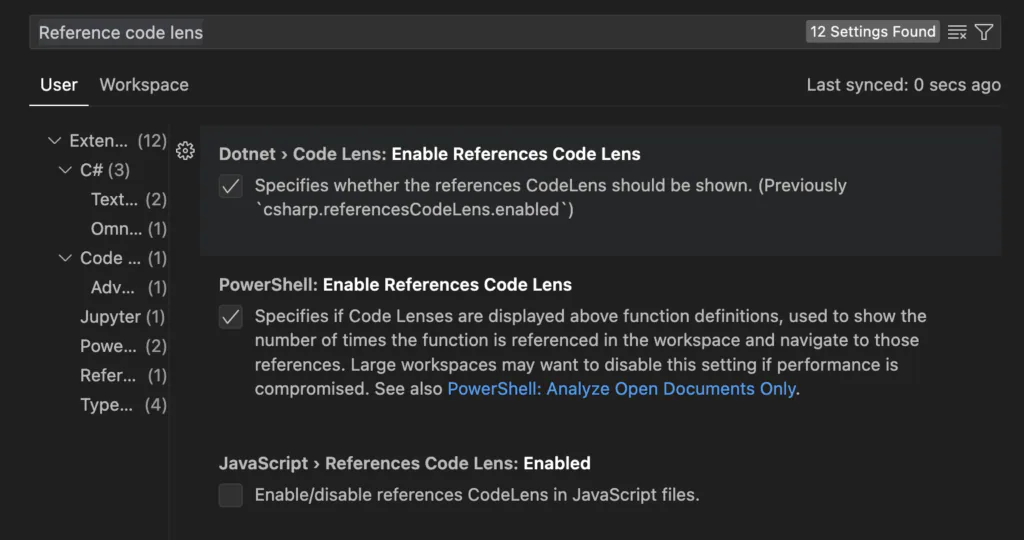
And that’s it! With this setting turned off, your editor will no longer display reference counts, giving you a cleaner, more focused workspace.
Conclusion
Disabling the reference code lens in VSCode is a simple tweak that can significantly reduce visual clutter when working on C#. By following the steps above, you can streamline your coding environment and bring more focus to the tasks at hand. Whenever you need the reference counts back, it’s just a quick settings change away.